 FDIC-Insured - Backed by the full faith and credit of the U.S. Government
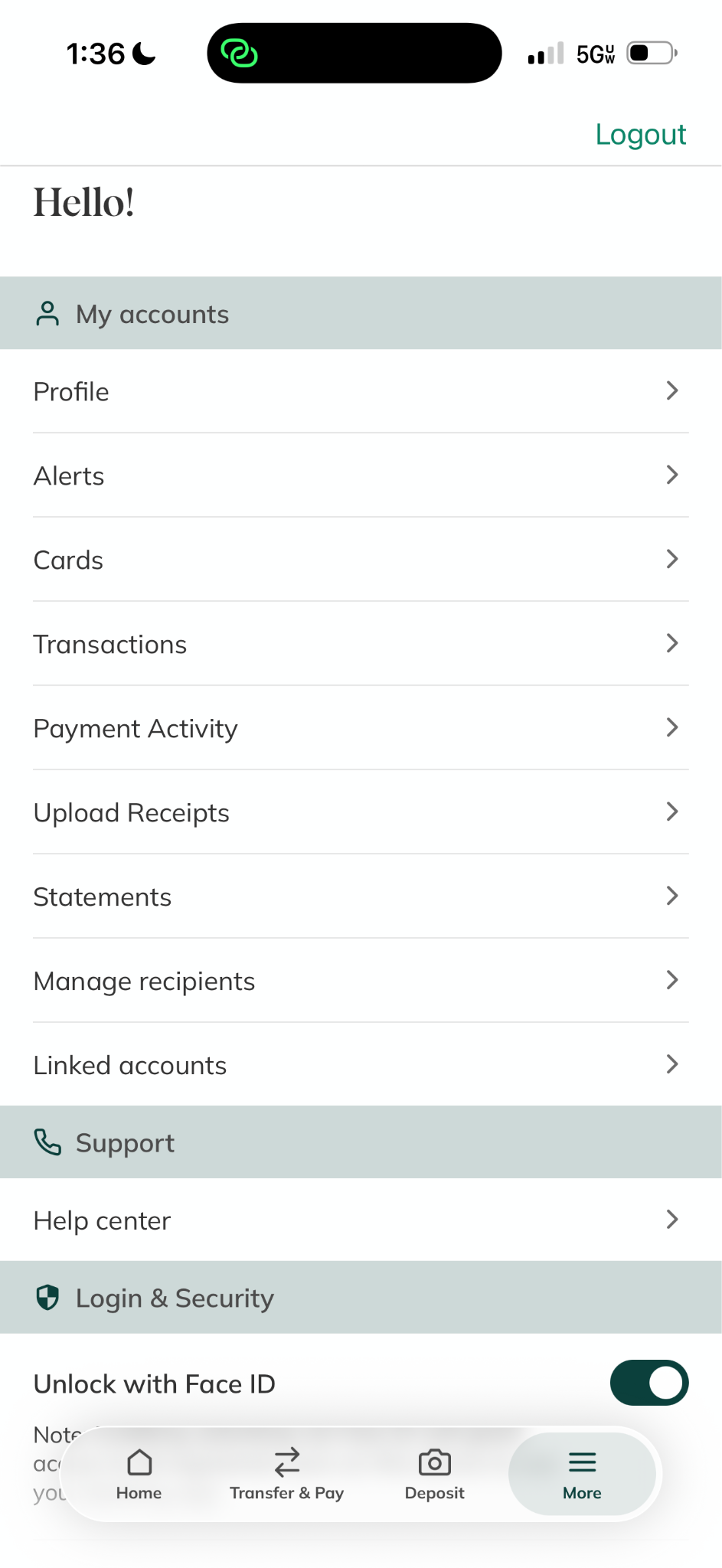
The More tab is the control center for your mobile banking experience. Use this section to customize your accounts, manage your day-to-day security, and explore integrated financial services designed to help your business scale.
 What You'll Find on the More Tab
Optimize Your Banking & Security
- My Accounts: Built to help you customize, monitor, and oversee your day-to-day banking relationship, from basic profile management to linking external accounts.
- Login & Security: Designed to protect your business assets by giving you full control over credential management, multi-factor authentication, and user access permissions.
Access Specialized Support & Services
- Support: Your direct line to self-service resources and guided help, ensuring you can quickly resolve questions without disrupting your operations.
- Services: The gateway to maximizing your Grasshopper partnership, where you can explore and activate integrated tools designed to streamline your operations and scale your business.
⚠️Important Note: The options and tabs available on your More tab may vary based on your specific business entity type, active accounts, product type, and authorized user permissions. If you do not see a specific feature or service listed, it may not be enabled for your user profile or business relationship.
My Accounts
Adjust your profile, monitor transactions, and manage daily account access.
- Profile: Manage your login credentials directly by updating your username or password.
- Alerts: Create and manage notifications for transactional or security-based events, such as low balances, outgoing transactions, or password resets.
- Cards: View and manage your business debit cards, including reporting a card lost or stolen.
- Transactions: Access a complete, detailed history of all transactions on your accounts.
- Payment Activity: Track the real-time status of all your incoming and outgoing payments.
- Upload Receipts (Coming Soon): Digitize your paper receipts by uploading images for streamlined expense tracking and bookkeeping.
- Statements: View, download, and save your monthly account statements or notices.
- Manage Recipients: Securely add, edit, or delete recipients for ACH transfers and wire payments.
- Linked Accounts: Connect and manage external bank accounts to easily move funds to and from your Grasshopper account.
⚠️Important Note: Push notifications are not currently supported at this time. To update your email, you will need to log into Online Banking on your web browser. To update your phone number or request an address change, you must contact Client Services.
Login & Security
Configure your authentication preferences and team access permissions.
- Unlock with Face ID: Enable biometric login to access your account quickly and securely without a password.
- Dual Approvals: Review, approve, or reject pending ACH and wire payments on the go, or toggle to the History tab to view past approval decisions.
- Two-Factor Authentication (2FA): Opt in to SMS verification for an added layer of login security.
- Manage Users: Add or remove team members, and define specific user roles and permissions for account access.
- Forget this Device: Remove the current device from your list of trusted devices, forcing re-authentication at the next login.
⚠️Important Note: Email verification is enabled by default to secure your account. To configure dual approval rules or settings, please log into Online Banking on your web browser.
Services
Explore additional financial tools and integrations to support your company's growth.
- Open a New Account: Easily expand your relationship by appling for any additional products, including checking, savings, treasury, or lending solutions.
- Innovator Savings: Explore our high-yield savings options designed to help your idle cash work for you.
- Innovator Term Loan: Learn about and apply for flexible term financing to fund your company’s growth.
- SBA 7(a) Loans: Access information and begin the application process for government-backed small business loans.
- Treasury: Open and manage high-yield treasury account options designed to optimize yield and secure liquidity for larger cash balances.
- Financial Insights: Use our integrated tools to gain a clearer picture of your company's cash flow and financial health.
- Key Documents: Access important legal and account-related documents in one central location.
- Plaid Connections: Manage the third-party apps and services you have connected to your Grasshopper account via Plaid.
- Autobooks Invoicing: Access our integrated partner solution to create and send professional invoices directly from your bank account.
- Xero Accounting (Beta): Connect your bank data to Xero to sync your transaction history in real-time, streamlining your accounting and tax readiness.
- Perks & Partners: Explore exclusive discounts and special offers from our curated network of partners.
- Debit Card Rewards: View and manage the rewards you’ve earned from your business debit card purchases.
⚠️Important Note:The options and tabs available on your More tab may vary based on your specific business entity type, active accounts, product type, and authorized user permissions. If you do not see a specific feature or service listed, it may not be enabled for your user profile or business relationship.
Helpful Resources & Policies
| Resource | URL |
| Transaction Cutoff Times | View Cutoff Times |
| Understanding Account Limits & How to Increase Them | View Article |
| Qualifying for Automatic Limit Increases | View Article |
| Mobile Banking Guides | View Guides |
Support
If you encounter any issues or need further assistance, you contact Client Services Monday-Friday 9am-9pm ET by dialing 888.895.9685 or emailing support@grasshopper.bank.
For your convenience, we also offer support via secure message or chat.